_1759756534716.png)

Resolving problems is a critical part of running any successful organisation. No business or team can claim to operate without encountering challenges, some small and forgettable, others significant and business-defining. With this in mind, it’s worth considering how to address issues effectively when they do inevitably arise. The key is having a ticketing system that allows you to log, track, resolve, and report on issues. Doing so not only makes the volume and severity of challenges clear, but also creates a repeatable workflow for resolving them, and provides insights to continuously improve the process.
There are plenty of sophisticated tools available to facilitate your internal and external ticketing needs, including platforms like Zendesk, HappyFox, and Freshdesk. The downside, however, is that relying on multiple niche systems often leads to a bloated, inefficient tech stack. Clickup solves this by allowing organizations to consolidate diverse workflows into a single platform, serving as a central hub for task and issue management. With this in mind, let’s explore the most effective way to configure your Internal Tickets Hub in ClickUp.
Architecture
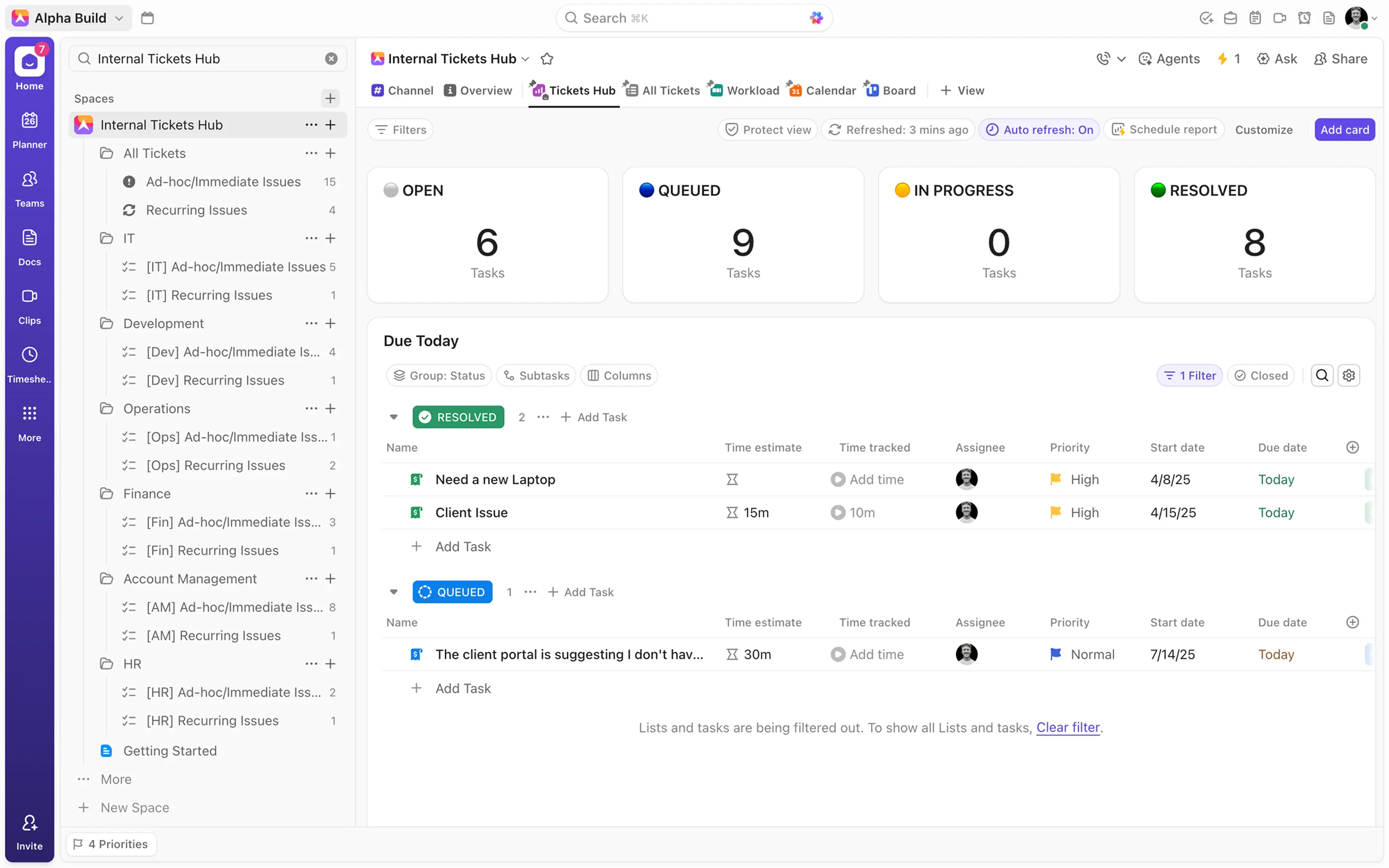
In ClickUp, architecture refers to the foundational hierarchy that organizes work, from the workspace level down to the individual task level. This structure enables us to group related work into dedicated locations, creating siloed areas for different business functions and their specific workflows.
Our Internal Tickets Hub is built on this principle.
When it comes to managing internal issues, a single source of truth is essential. This is why it’s beneficial to establish a dedicated ‘Internal Tickets Hub’ Space to capture and house all requests from your teams. This scalable system provides both global visibility for leadership and focused resolution streams for individual departments.
Within this Space, start by creating an “All Tickets” folder to serve as the central repository. Inside this hub, it's useful to establish two distinct resolution streams - one for ad-hoc issues, and one for recurring issues. The “Ad hoc/Immediate Issues” list will serve as the primary workflow, enabling teams to capture all internal tickets through internal ticket submission forms. Alongside it, a “Recurring Issues” list supports the resolution of larger, ongoing challenges, ensuring that they get the attention they require. To further streamline this process, it’s helpful to create dedicated folders for key departments, such as IT, HR, Operations, and so on. This creates siloed resolution streams, providing departments with streamlined visibility on the tickets that relate to them.
Tracking Ad-Hoc and Recurring Issues in ClickUp
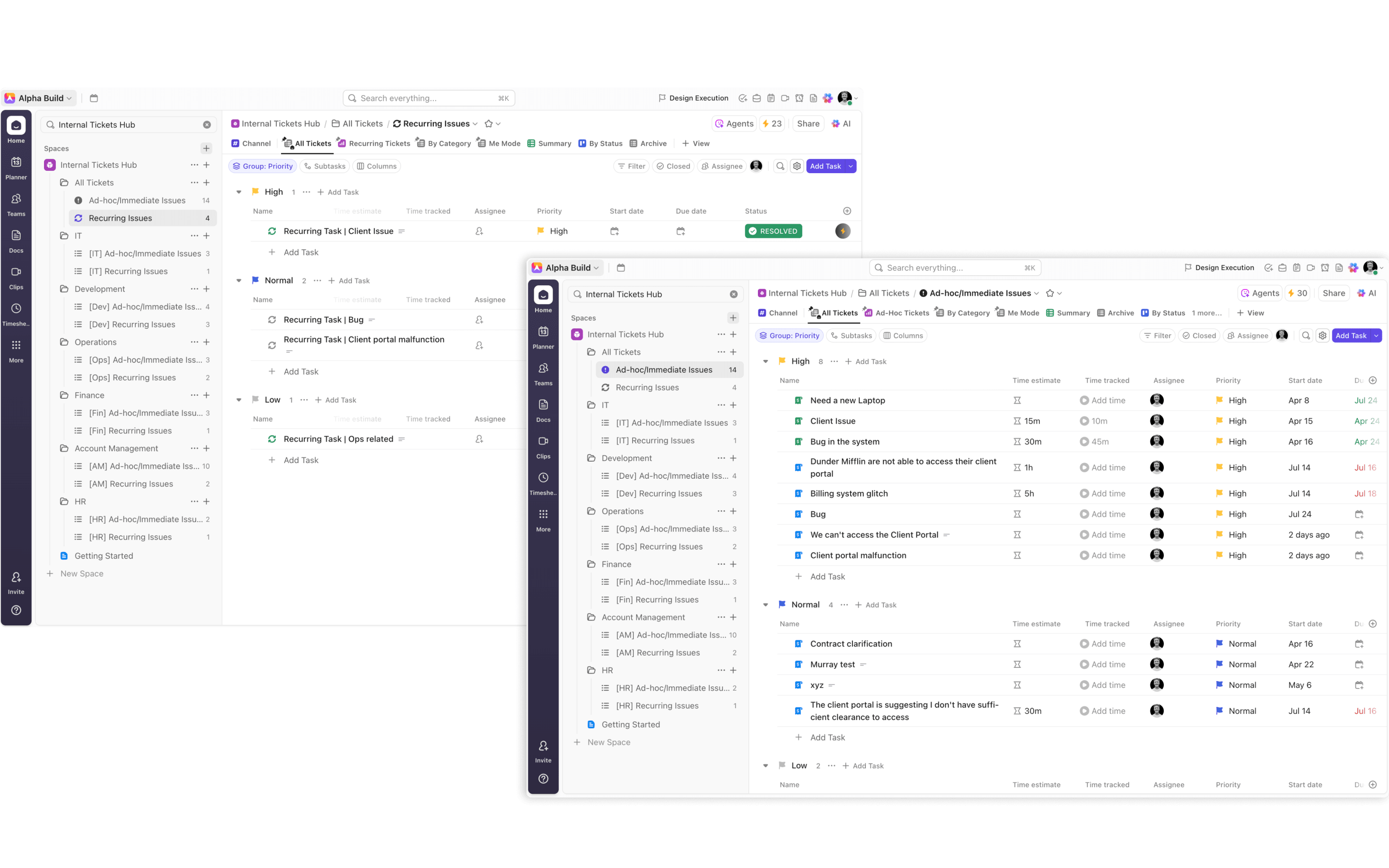
In most organizations, two types of internal issues present themselves: Issues that arise at random, requiring immediate resolution; and issues that recur, or point to larger, more overarching problems. The latter tends to require a more strategic, thought-out resolution process that can often take a long time to establish and implement. Whilst ad-hoc issues tend to require immediate attention and are typically far easier to resolve.
With this in mind, it’s useful to establish two distinct Resolution streams to facilitate these very different workflows. That way, you ensure that your organization stays on top of the issues they need to resolve right now, while giving sufficient time, resources, and attention to recurring issues that point to bigger problems. An added benefit of this approach is the ability to differentiate between these Resolution streams in your reports. By separating these workflows, you ensure accurate resolution reporting. This helps you to accurately report on your two Resolution streams for greater insights.
Internal Request Forms with Conditional Logic
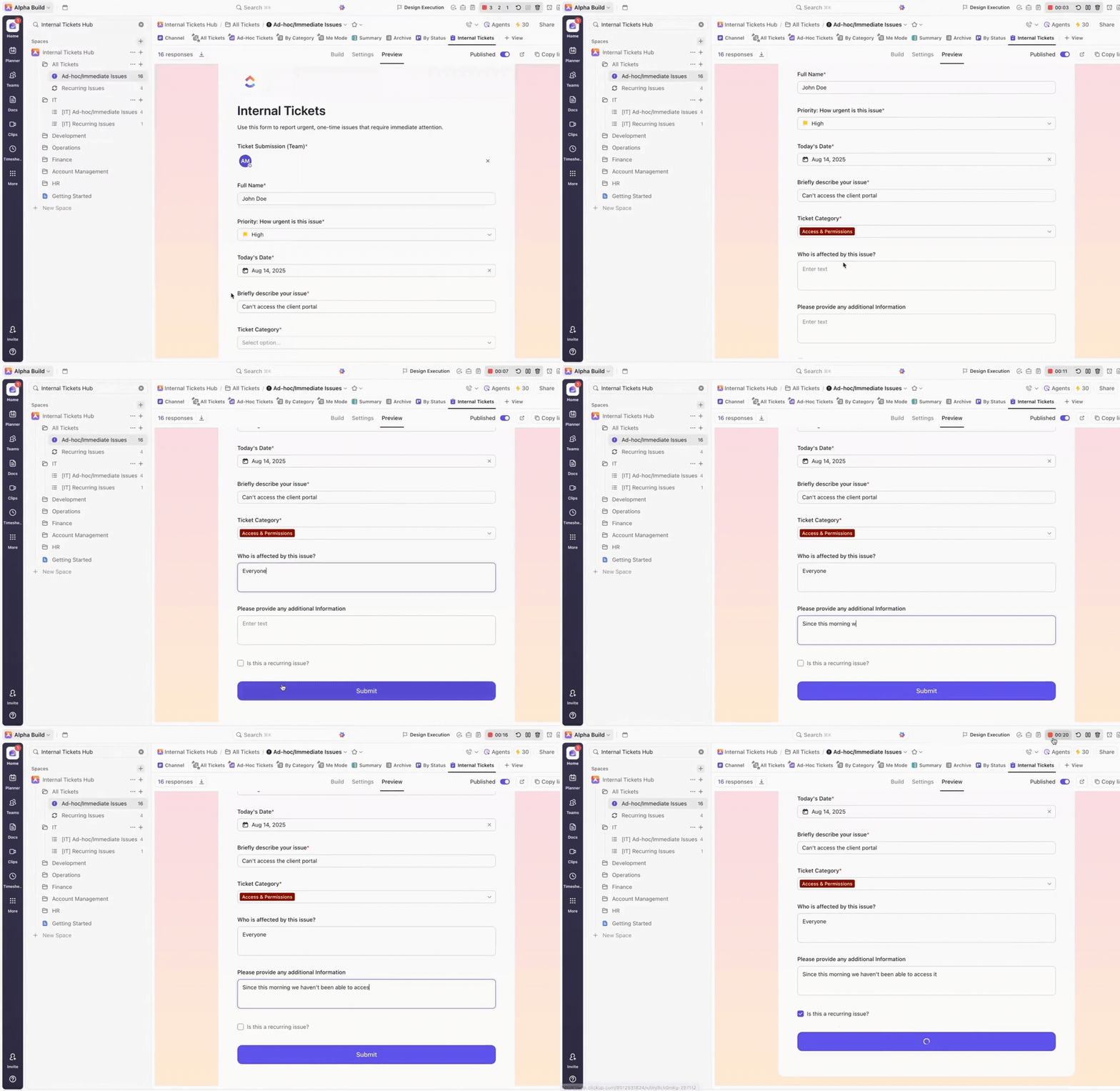
We’ve outlined the optimal structure for your Internal Tickets Hub, but how do you actually collect internal requests? ClickUp’s internal ticketing system makes this process seamless with its Forms feature. Forms enable team members to submit internal requests or issues via a simple link. Each submission automatically creates a task in ClickUp, capturing all the details provided in the form. Forms are created as a view on a specific list and can be customized to match your internal processes. Using both custom and native fields, you can gather essential information, including ticket urgency, issue type, error codes, and so on. Recent enhancements also give you more control over the form’s appearance, so that you can make the desired visual changes, such as adding a company logo, adjusting the colour scheme, or changing the forms formatting.
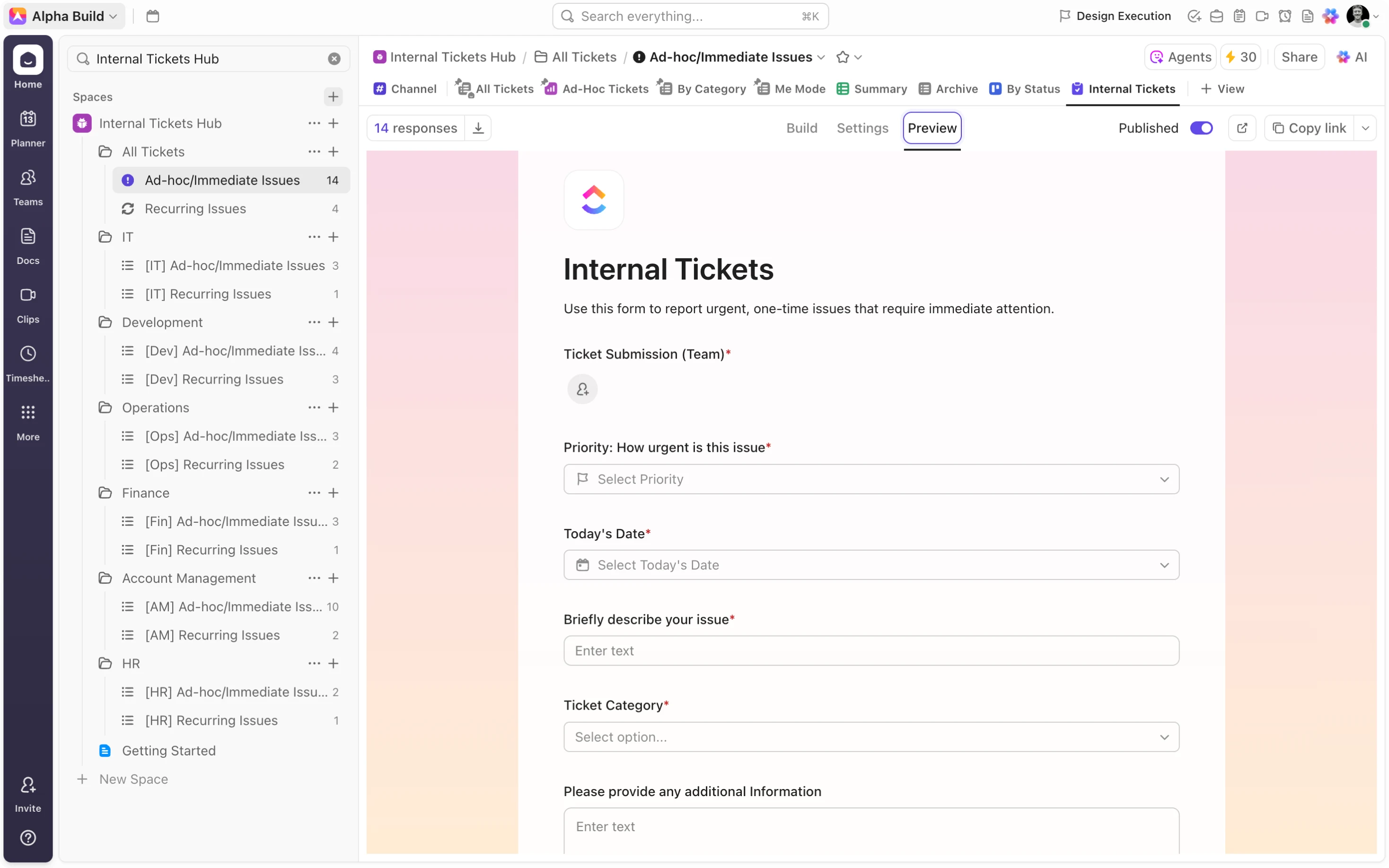
With the addition of conditional logic, you can tailor follow-up questions based on previous answers for more precise data collection. For example, when building your internal Ticket submission forms, include a “Issue Type” or “Ad-hoc Issue” dropdown with conditional logic. This way, depending on the selected request type, the form will prompt for additional, relevant details specific to that category. Use these strategies to create a robust “Internal Tickets” form view on your “Ad-hoc/Immediate Issues” list, ensuring that all internal requests are captured and managed efficiently.
When it comes to capturing recurring issues, there are two workflow options. Either you create an additional form in your “Recurring Issues” list, or you create a trigger in your primary “Internal Tickets” form that creates an additional ticket in your “Recurring Issues” list. For a more streamlined approach, consider having one “Internal Tickets” form with the inclusion of a “Recurring Issue” checkbox. As always you can make use of automations to create a task in the “Recurring Issues” list whenever the checkbox is checked. In this way, you maintain the simplicity of a single “Internal Tickets” form while allowing for distinct resolution processes.
Resolution Reporting
A backlog of unresolved internal issues will undermine the success of any organization.
We’ve discussed the importance of an intuitive internal ticketing system to avoid this outcome, but what other steps should you take to ensure that your internal issues are swiftly dealt with? One important step is to produce insightful reports that allow you to monitor the success of your resolution process. This is the first step towards continuous improvements, introducing the visibility and accountability needed to supercharge this workflow.
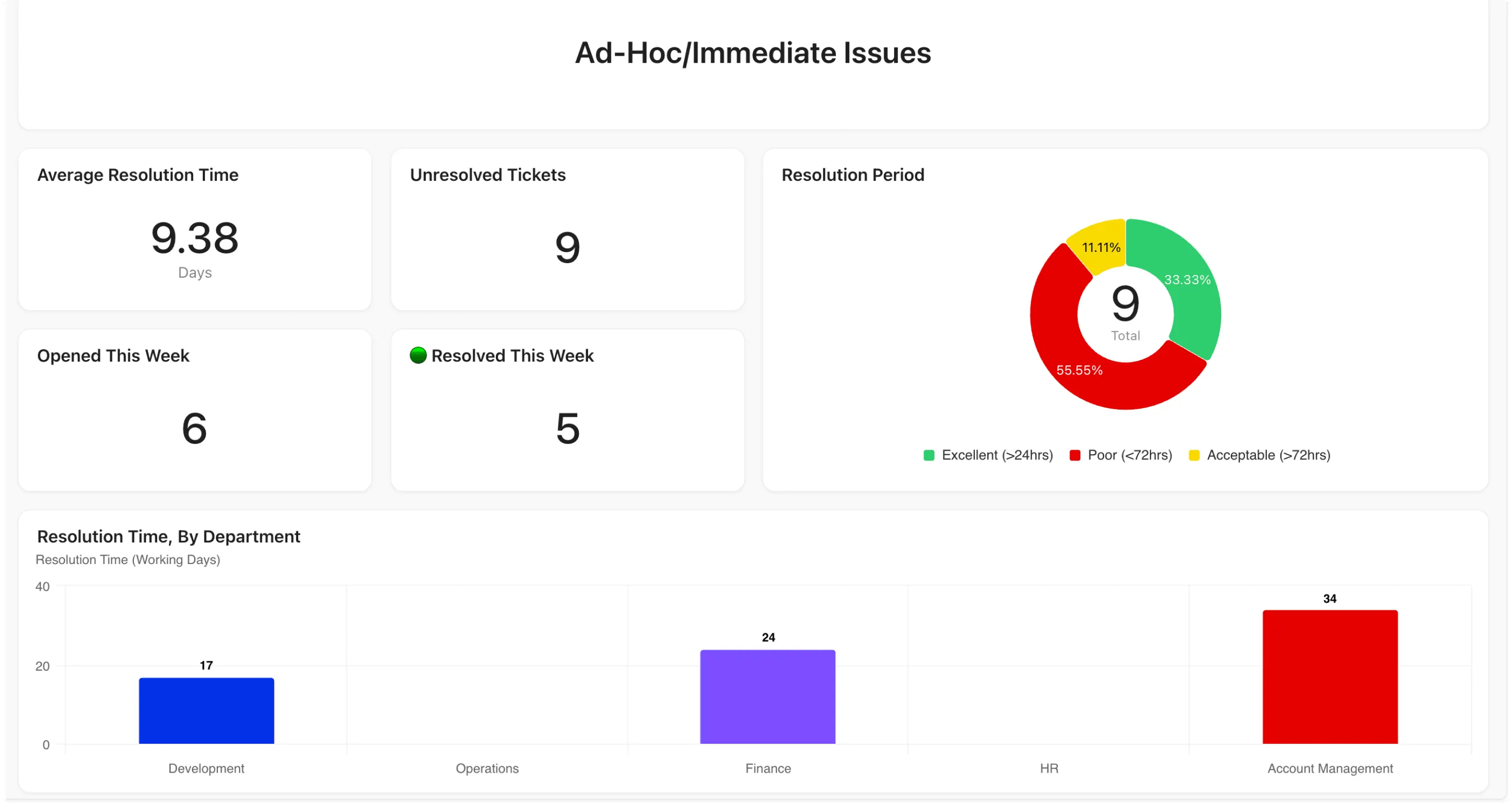
This is where dashboard views play a big role, allowing you to create a library of widgets that group key data by department, priority, issue type, etc. with information updating automatically as tasks progress. This makes it easy to monitor resolution speed across different internal groups and quickly spot bottlenecks or areas needing improvement.
ClickUp’s formula fields further enhance reporting by enabling you to calculate meaningful metrics. For example, using the ‘NETWORKDAYS’ function with the “Date Created” and “Date Done” fields allows you to measure how many days it takes to resolve each internal ticket. You can also add a “Resolution Period” dropdown, linked to “Resolution Time” using automations, to categorize tickets into groups like “Good (<24hrs)”, “Average (<72hrs)”, and “Poor (>72hrs)”. When these metrics are displayed in dashboard reports, you gain clear insights into average resolution times, trends by department, and overall internal support performance.
_1759152712185.webp)
Resolution Streams
When designing an internal tickets hub, it’s important to think about how to optimize it for both current needs and future growth. The key question is: How can we build a system that scales as our organization evolves?
A proven approach is to create segmented resolution streams. As your company grows, the volume of internal requests can quickly overwhelm a single, centralized list, making it difficult to triage and track every ticket. To prevent requests from slipping through the cracks, it’s best to route tickets directly to the relevant teams or departments for resolution - while still maintaining a unified, global view of all activity.
This can be achieved by setting up ‘mirror’ department folders that act as streamlined duplicates of the main “All Tickets” folder. By combining an “Issue Type” custom field with automations, tickets can be automatically moved to the appropriate “[Department] Ad-hoc/Immediate Issues” list and added back to the central list. This ensures you have a single source of truth, while also enabling more focused resolution streams that clarify ownership, reduce overload, and support organizational growth.
To provide your departments with additional visibility, consider also adding their ticket submissions to their department folders in a dedicated view – ensuring that they have visibility on both the tickets they’re responsible for resolving and the tickets they’ve submitted to be resolved by another team. To do this, it’s helpful to create Teams to represent and encapsulate each of your departments. Tickets can then be submitted by teams rather than individuals, before employing powerful automations to add tickets to the corresponding department based on team selection.
You can apply the same structure to your recurring issues workflow, creating dedicated department silos for managing both resolution workflows. This setup not only streamlines ticket resolution, but also makes it easy to track, compare, and report on performance across different teams.
The ability to swiftly resolve internal issues is an essential component of any thriving organisation. An intuitive system – one that allows you to log, track, resolve, and report on your issues – makes this possible. To create one of these systems, there are a range of tools that organizations can look to. However, if you’re looking to house all of your workflows in one location, then ClickUp stands out as the obvious choice. With easy-to-use ticket submission forms, advanced reporting features, and the ability to create siloed resolution streams, it’s hard to find a reason not to opt for this all-in-one productivity tool.
