
_1760051333443.webp)

Agile teams often find themselves pulled between two extremes. On one side, Scrum methodology provides a highly structured system with sprints, roles, and ceremonies - but can feel rigid and unable to adapt. On the other hand, Kanban offers flexibility and continuous delivery, but fails to outline any clear system or process for driving results.
For many, the solution lies in the middle: Scrumban. Developed as a way to marry the structure of scrum with the flexibility of kanban, Scrumban borrows the most powerful elements of both of these frameworks, helping your team build a system that has sufficient structure to drive results while maintaining the flexibility that is essential to any dynamic organization. And when it comes to integrating the Scrumban framework into your workflows, ClickUp is an ideal tool to bring it to life.
So, What is Scrumban?
Scrumban is an agile methodology that combines the structured planning of Scrum with the visual flow of Kanban. Teams use a Scrumban board to manage work items, apply WIP (work-in-progress) limits, and run ceremonies such as retrospectives, while still working in a continuous flow rather than fixed sprints. The result is a practical system that encourages continuous improvement without locking teams into rigid cycles.
Architecture
When designing a Scrumban workflow in ClickUp, the first step is always deciding on the structure or ‘architecture’. The system needs enough structure to give clarity but must remain flexible for day-to-day operations. It is therefore essential to establish an intuitive architecture that assists rather than undermines your workflows. The primary challenge is to design your Scrumban architecture to meet two competing needs: It must be integrated with the wider workspace for a cohesive overview, yet remain distinct enough for dedicated tracking and reporting. You'll need to use the workspace's inherent hierarchical structure—which organizes work into separate locations—to achieve this balance.
Setting up your Scrumban backlog setup in ClickUp:
-
Create a Scrumban Space - this will house your entire Scrumban framework
-
Create a Scrumban folder - this folder will house all of your Scrumban workflows. The Scrumban framework is fairly simple with three primary workflows:
-
Ceremonies - Recurring meetings with descriptions, agendas and best practices.
-
Backlog - Backlog intake form + fields like Issue Type, Time-Frame, T-shirt size etc.
-
Delivery flow - Your active Kanban workflow where work actually gets done.
This setup forms the backbone of your Scrumban backlog, ceremonies, and delivery system in ClickUp. To take your Scrumban space to another level, consider creating dedicated department folders fitted with [dep #] ceremonies, [dep #] backlog, and [dep #] delivery flow designed to mirror your Scrumban folder. Combine powerful automations with intuitive custom fields to ensure that tasks get added to the relevant department folders, forming dedicated resolution siloes.
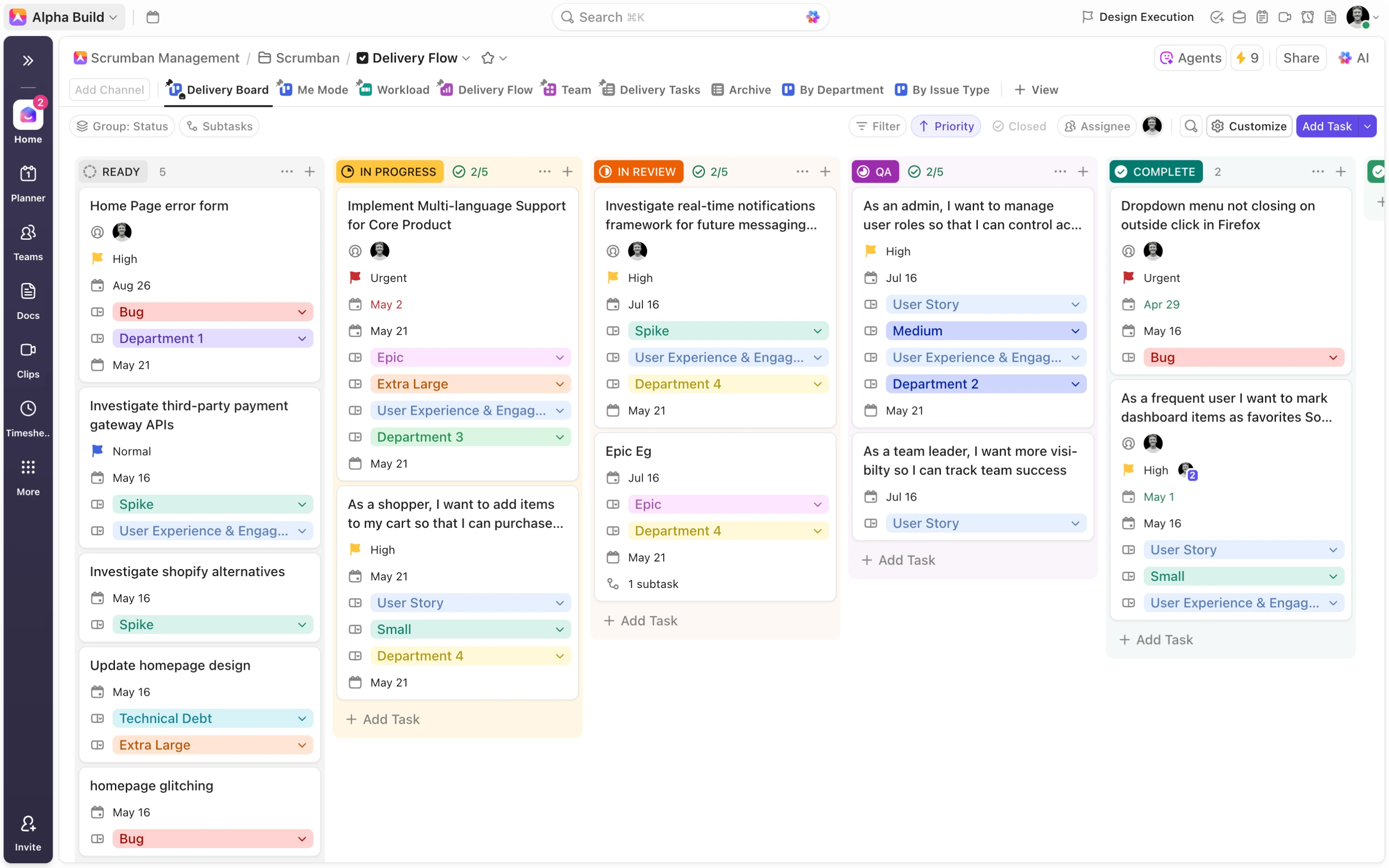
Visualizing Work: Boards, Lists, and Custom Views
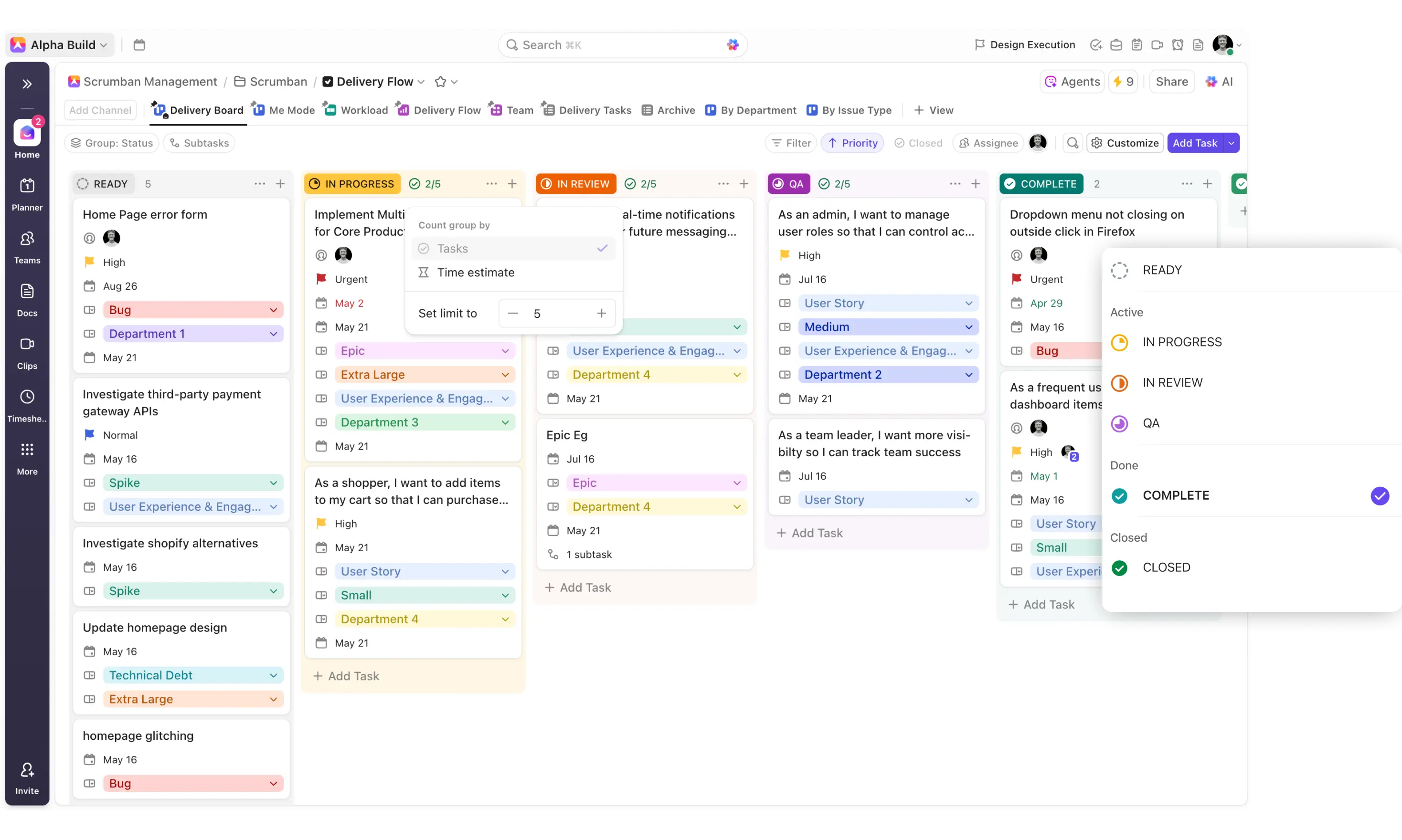
The Kanban-style board is fundamental to the Scrumban framework. The framework allows you to visualize each of your tasks and their progress through the different status options, dragging and dropping tasks into new statuses as they move through the workflow. With ClickUp’s board view, you have an optimized, customizable Kanban board available in every workflow across every level of the hierarchy. Formatting options equip you to decide on the visible fields, group your tasks according to status, priority, etc., filter for certain subsets of the data, and apply WIP limits to comprehensively reflect the Scrumban workflow.
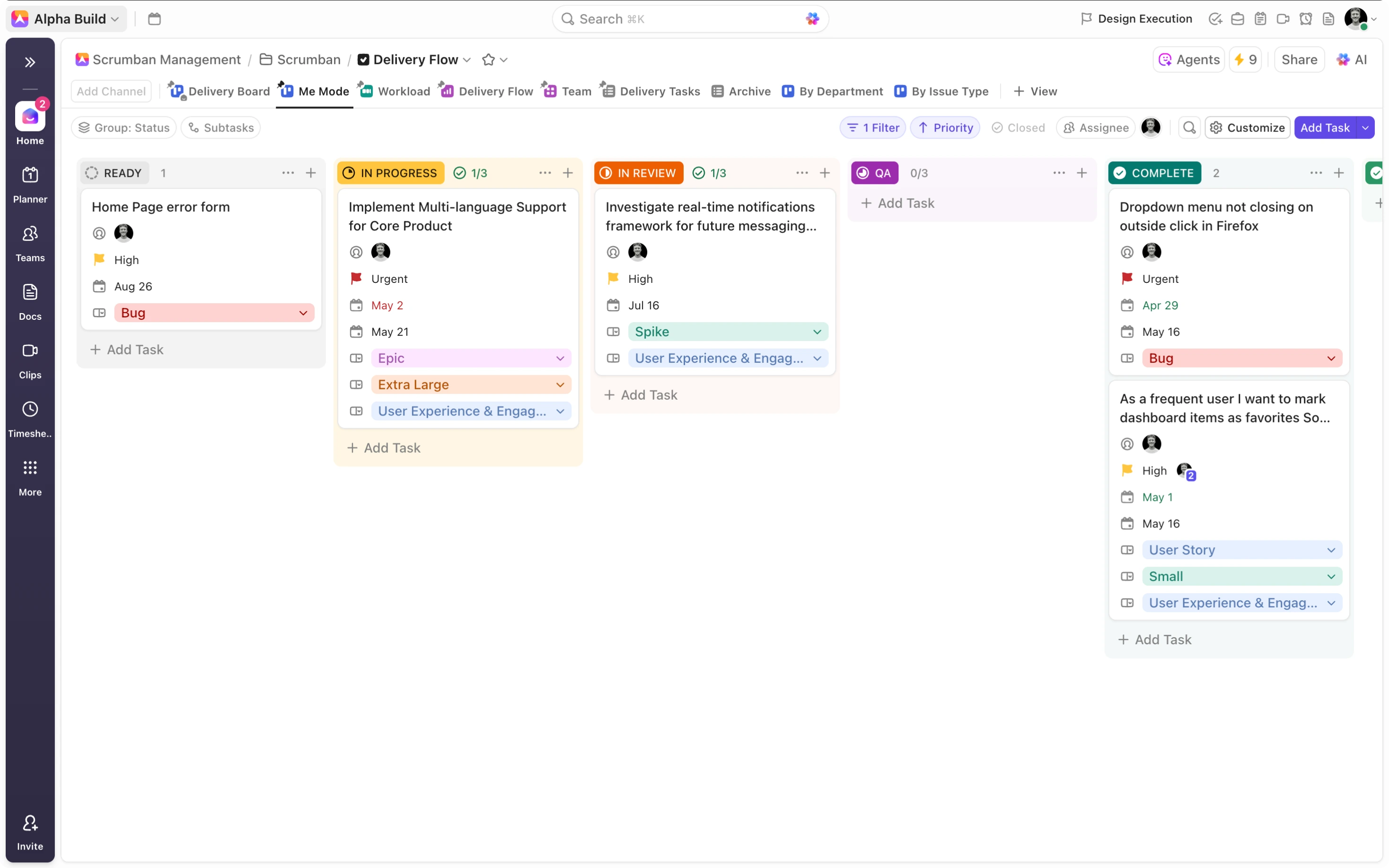
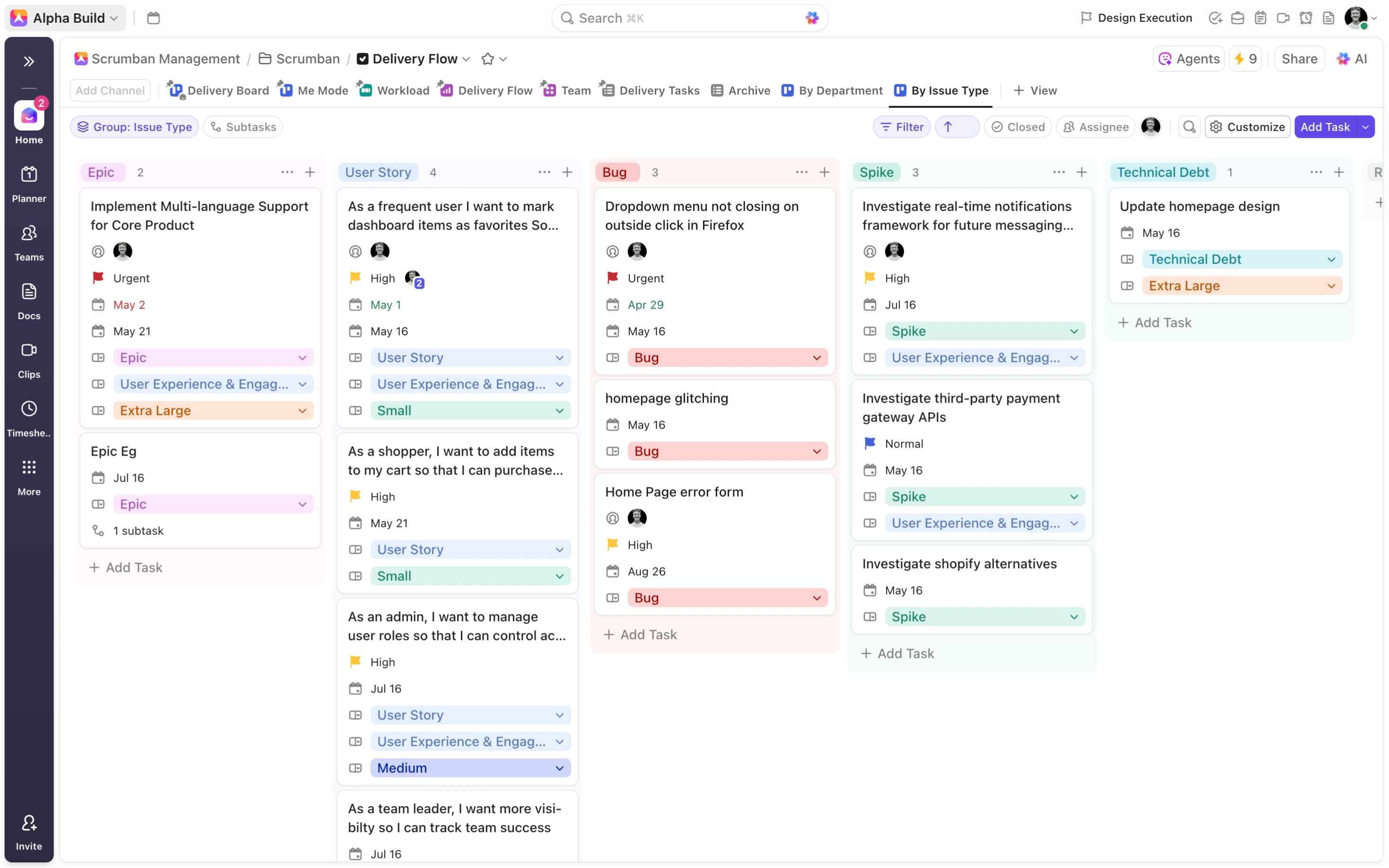
ClickUp allows you to add additional views to each location in your workspace. Make use of this powerful feature to enhance your workflows. Consider for example, including a ‘Me Mode’ view, employing the tools dynamic ‘Me Mode’ filter to provide visibility on the subset of tasks assigned to me. Create additional ‘Issue Type’ boards, ‘Workload’, and ‘Calendar’ views to focus on vital task details for comprehensive visibility across all aspects of your workflows.
Managing Priorities and Flow: WIP Limits and Task Statuses
While the kanban board visually represents and facilitates our delivery flow, it’s the status options, WIP limits, and workflow automations that ultimately inform the way the workflow functions. Status options are the most fundamental of these, allowing you to visualize your workflow, set WIP limits, identify bottlenecks, and manage and measure flow. Your status options should be informed by your unique use case allowing you to effectively map out your workflow. If you’re unsure of the status options for your organisation’s delivery flow, consider opting for something like: Ready → In Progress → In Review → QA → Complete → Closed.
Once established, status options then inform your WIP limits, allowing you to outline the maximum number of tasks in each status. This sets the tone for your delivery flow, ensuring that you maintain a steady, manageable workflow. In addition, it helps you to identify bottlenecks, bringing your attention to statuses that are often nearing or over their WIP limit.
Automating Scrumban Workflows in ClickUp
Automation is where Scrumban in ClickUp really shines.
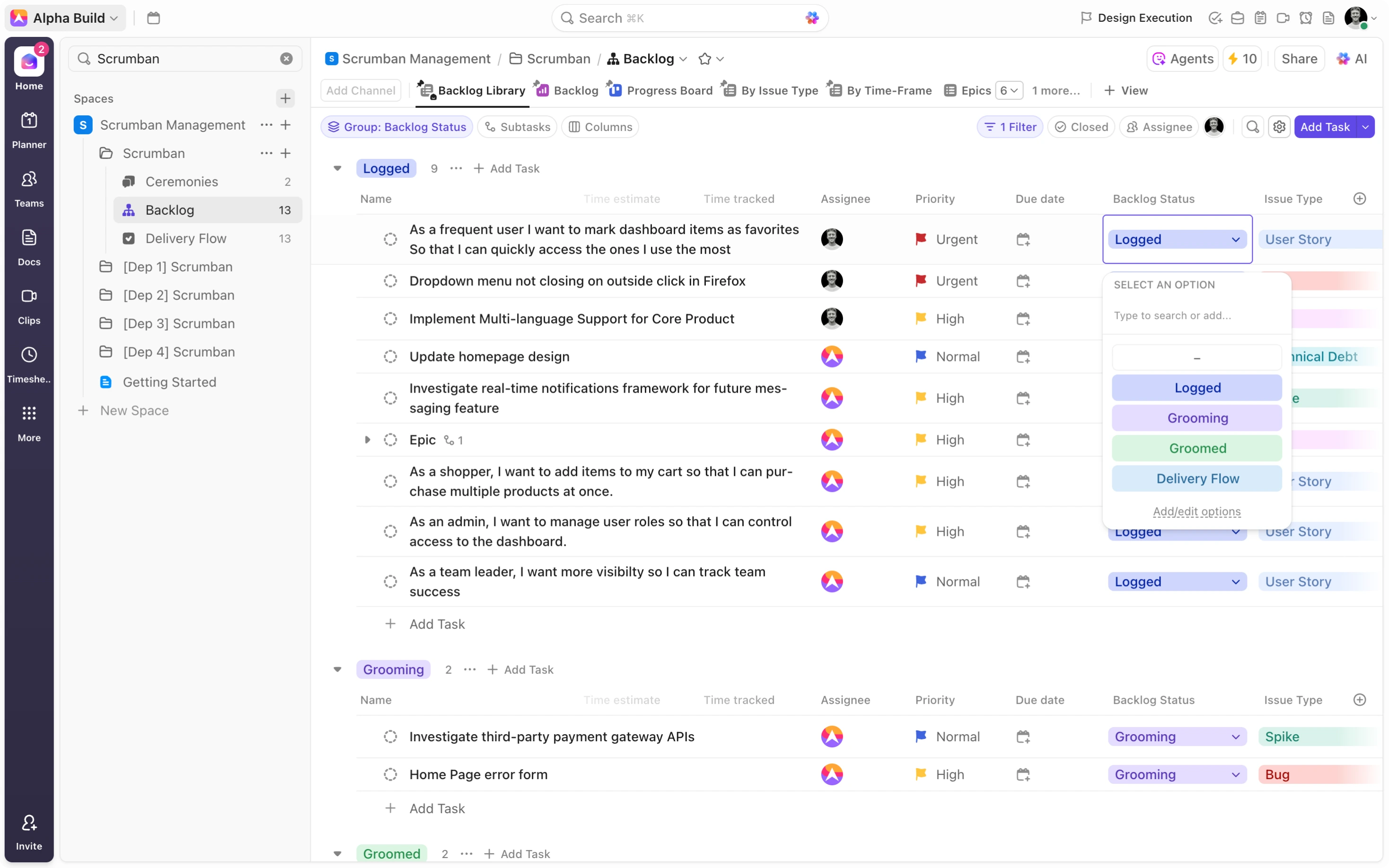
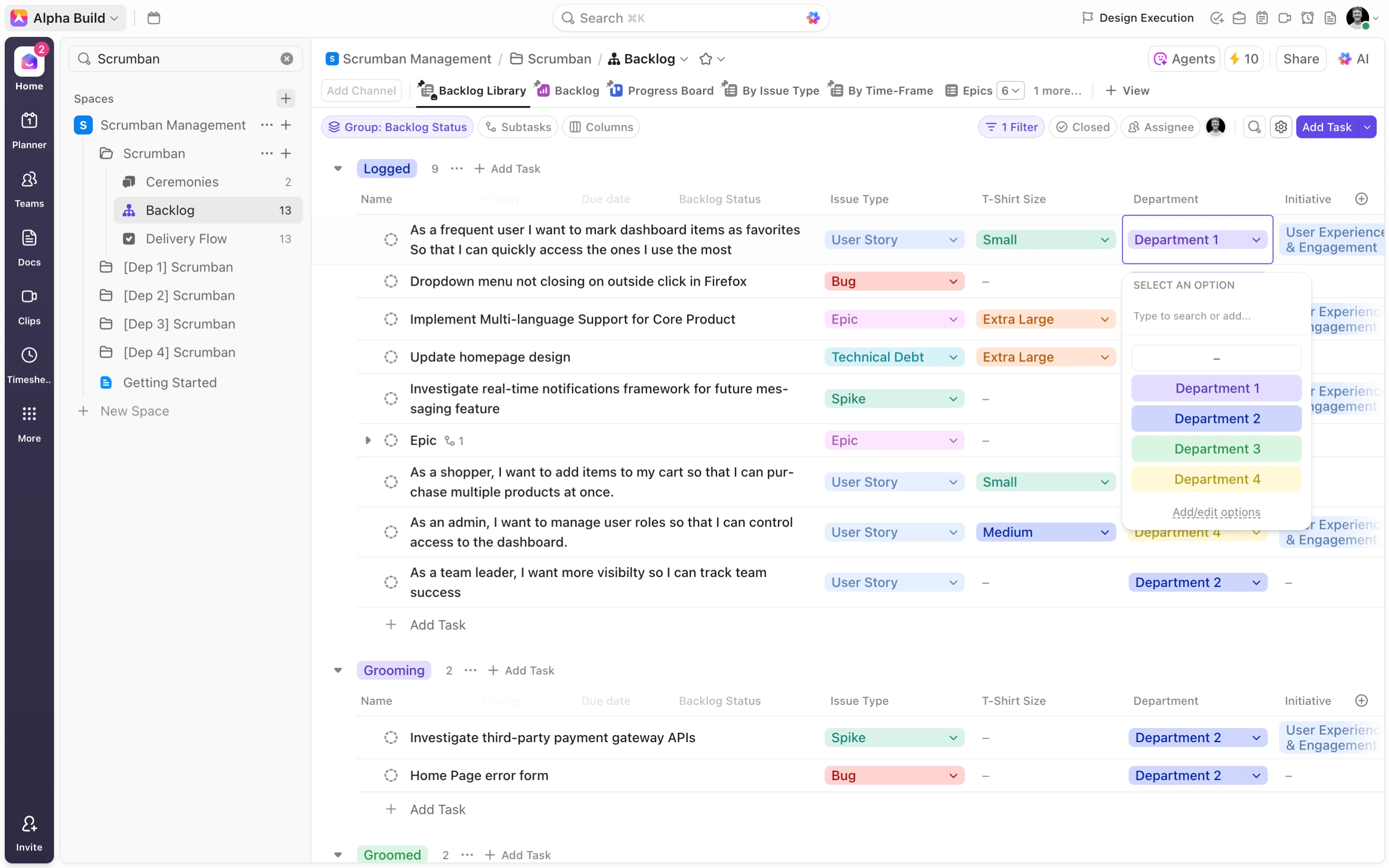
The most obvious and effective automation is the one that streamlines the flow of items from your backlog to your delivery flow. Tasks need to be pulled from the backlog in the most efficient way possible to save your team time. Consider a two-step process in achieving this. First, since you will be “adding” rather than “moving” tasks to your delivery flow, create a custom ‘Backlog Status’ for your backlog. In your custom ‘Backlog Status’ dropdown, add status options: logged, grooming, and groomed. Add an additional ‘Delivery Flow’ status option to streamline this workflow. Secondly, create an automation that adds backlog items to the delivery flow on ‘Delivery Flow’, creating an intuitive, efficient workflow. Group your tasks by ‘Backlog Status’ and filter out tasks in the ‘Delivery Flow’ status to achieve exceptional visibility in your backlog.
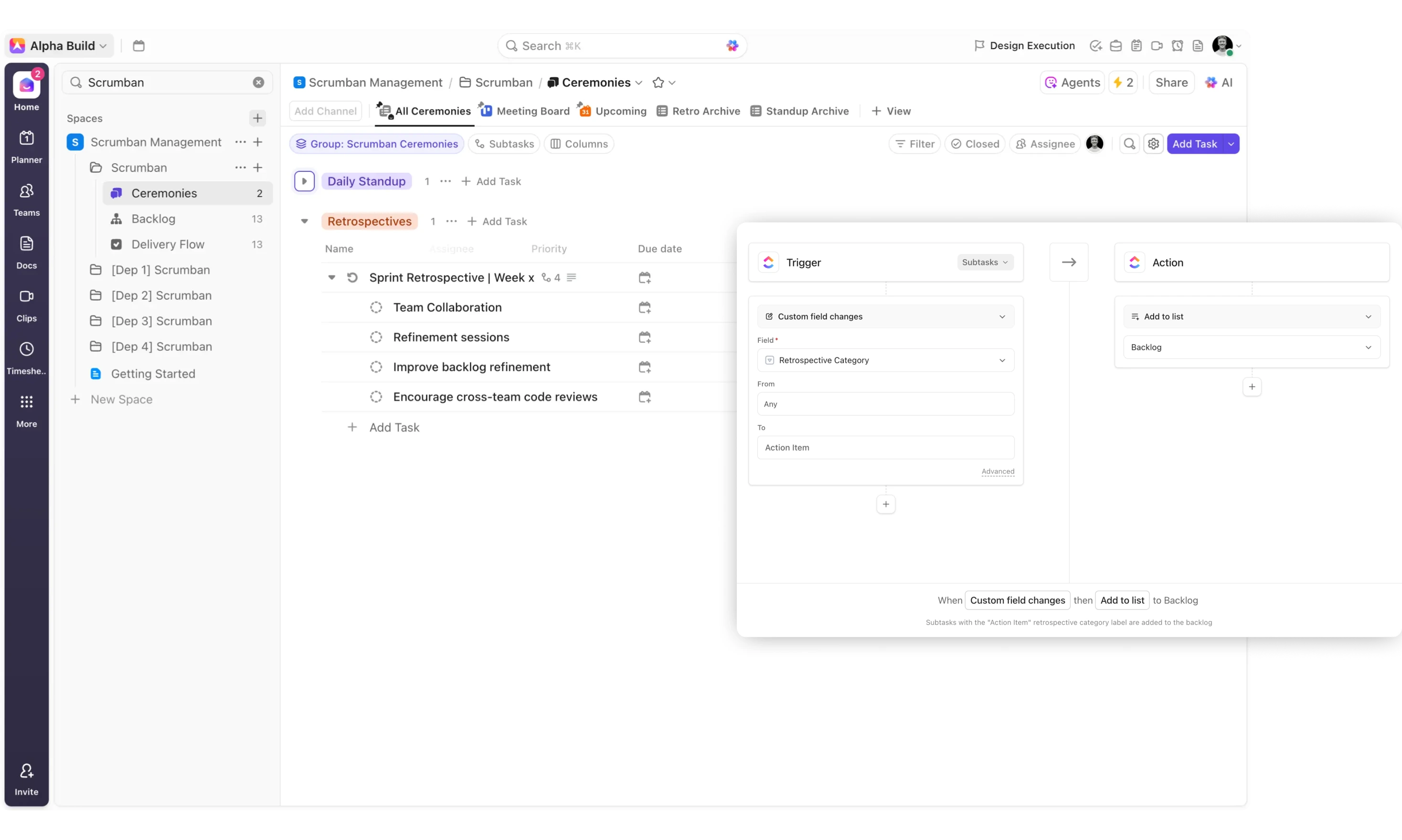
In a similar way, you can look to automate the Scrumban retrospectives feedback loop. Since we know that a key priority of our retrospectives is identifying process improvement opportunities, and outlining the necessary action items to achieve them, it’s helpful to consider ways to automatically add these action items to your backlog.
-
Retrospectives
-
Create a ‘Retrospective Category’ dropdown used to distinguish between things that ‘Worked Well’, ‘Needs Improvement’, and ‘Action Items’.
-
Create and label these outcomes as subtasks on your corresponding retrospective ceremony for added context.
-
Additionally, introduce automations that add ‘Action Item’ subtasks to the backlog, creating a seamless feedback loop for continuous improvement.
-
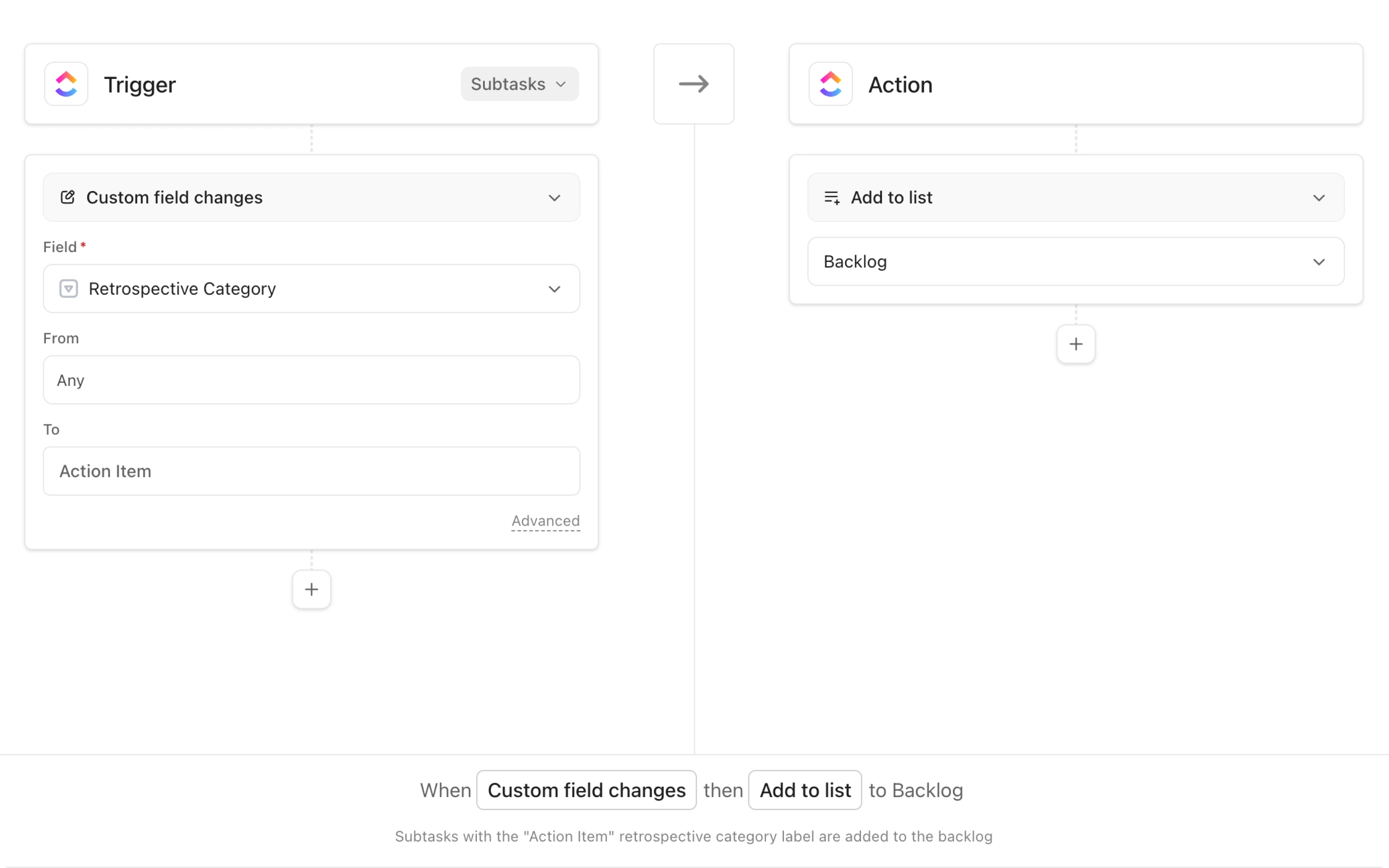
To supercharge your Scrumban system, consider a series of sophisticated automations that allow you to seamlessly add the correct tasks to corresponding department folders.
-
Department Workflows
-
Create department folders to mirror the scrumban framework.
-
Duplicate each of the ceremonies, backlog, and delivery flow lists and move them to dedicated department folders that reflect your organisation's structure.
-
Strip these lists of all tasks, automations, and forms.
-
Once you’ve created your departments, introduce a ‘Department’ dropdown field into your backlog and delivery flow, mapping out each of your departments as options. As a backlog grooming step, make it a priority to outline the department responsible for resolving each item in the backlog.
-
Once these steps have been taken, create a series of automations in your backlog ensuring that tasks are added to the correct [dep #] backlog whenever the ‘Department’ dropdown is indicated.
-
Include further automations in your delivery flow ensuring that tasks are added to the correct [dep #] delivery flow list based on the ‘Department’ selection.
-
Finally, introduce automations in your ceremonies list to add ceremony tasks to the necessary [dep #] ceremonies lists on creation.
-
With these sophisticated automations, you create siloed resolution streams, helping your teams hone in on the tasks that are relevant to them!
Dashboards for Continuous Improvement
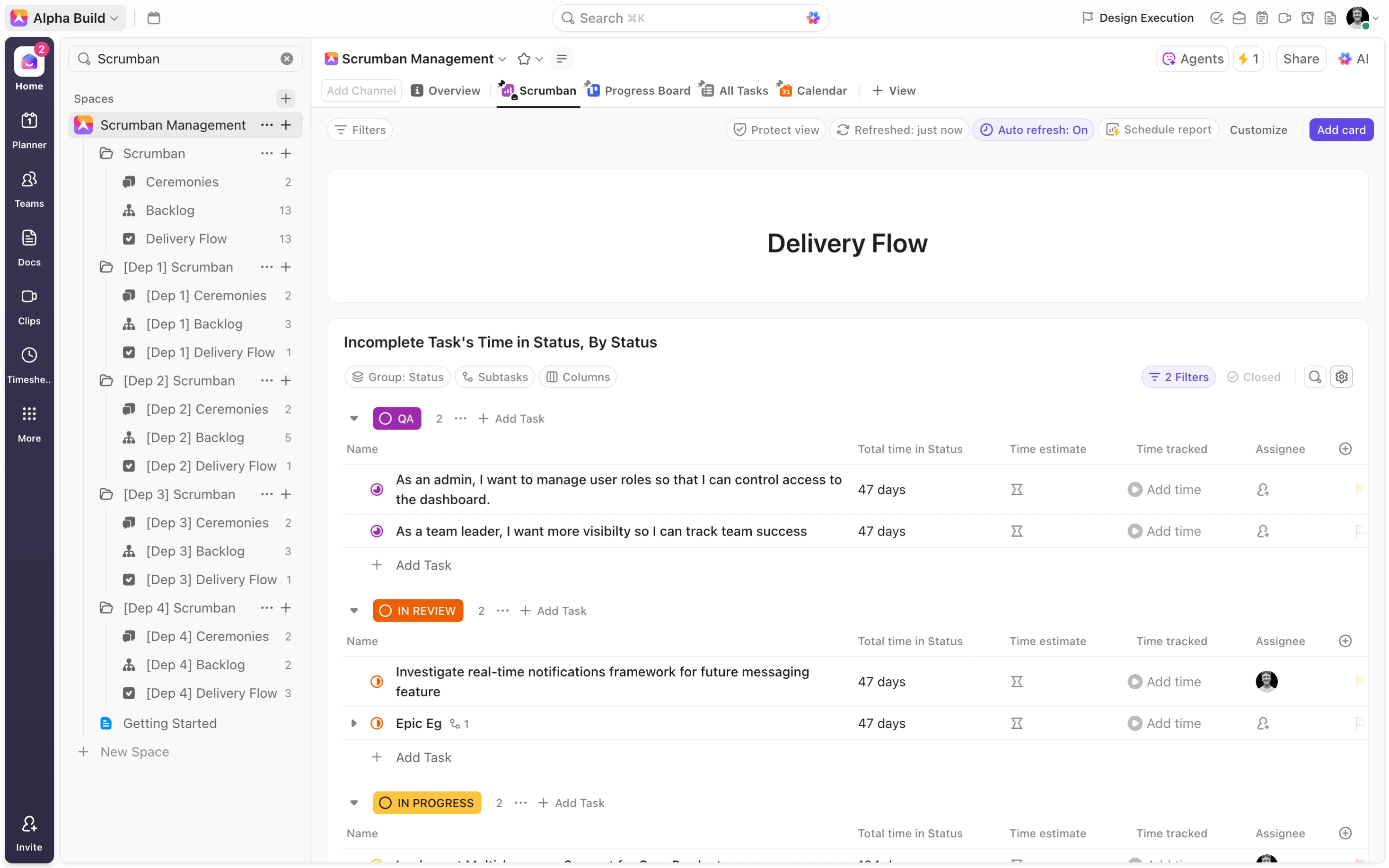
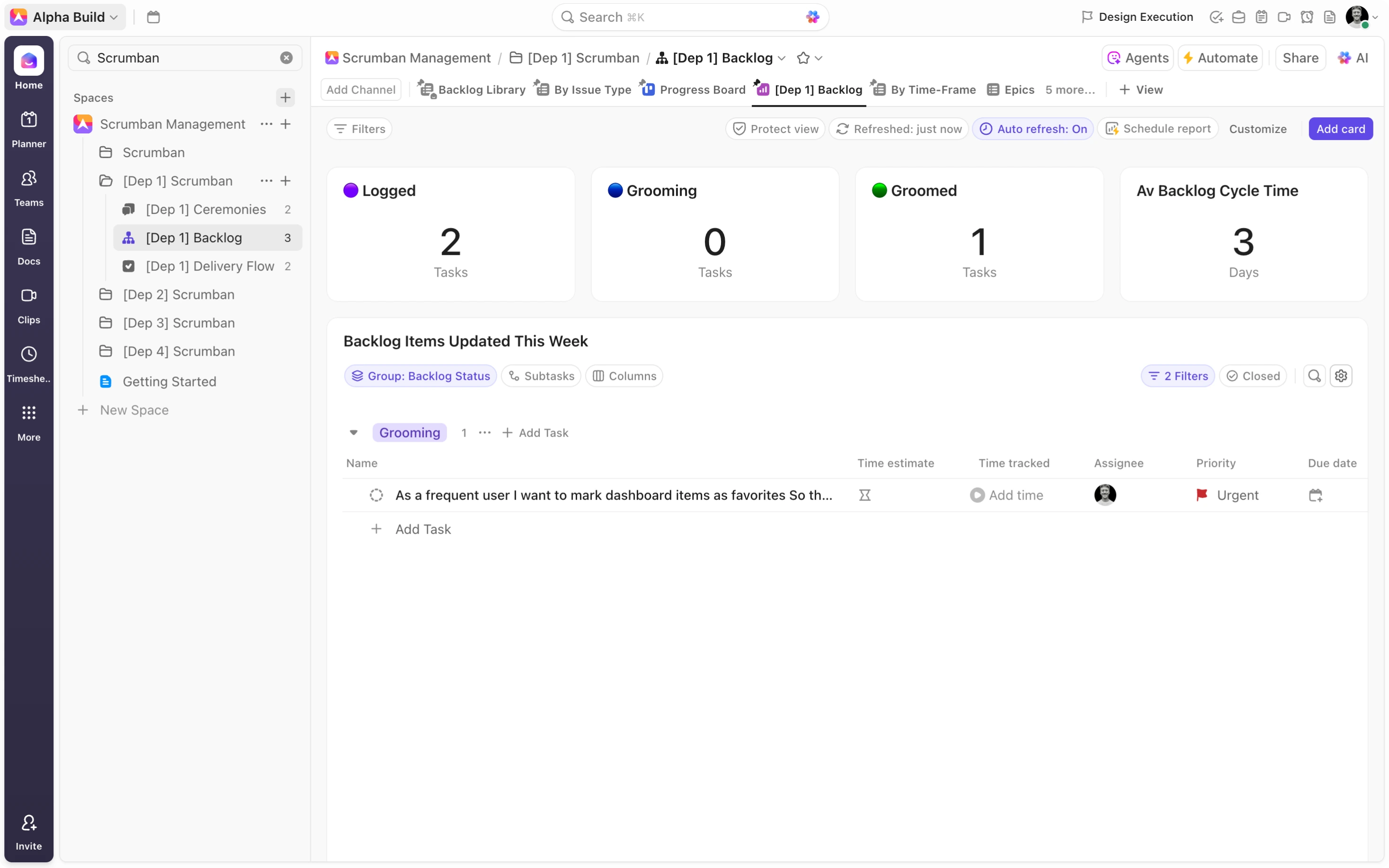
Amongst ClickUp’s library of views, dashboards stand out as the most powerful. Allowing you to choose from a range of widgets or cards, dashboards let you pull fields into charts, graphs, and calculation cards to deliver insightful reports. Dynamic in nature, these dashboards are always up to date, reporting on past and current tasks in your workflow.
When it comes to your Scrumban workflow, combine custom date fields, formula fields and automations to calculate cycle and lead times across all of your tasks. We know that lead time is the entire period from when a task enters the backlog until it is completed. Therefore, create a custom date field in your backlog named, ‘Backlog Start Date’. Use powerful automations to ensure that the ‘Backlog Start Date’ is set whenever a task is created, added, or moved to the backlog. Utilizing ClickUp’s native ‘Date Done’ field, you can then create a ‘Lead Time’ formula field in the delivery flow using the ‘NETWORKDAYS’ function. Similarly, combine a ‘Delivery Flow Start Date’ date field with automations to ensure that the date is set when tasks enter ‘In Progress’ in our delivery flow. A subsequent ‘Cycle Time’ Formula field can then be employed to calculate the cycle time.
With detailed, informative reports, you equip your team with the tools needed to run effective retrospectives. Dashboards deliver fresh insights into the necessary process improvements required to continue improving your Scrumban workflow.
_1759168148352.webp)
Creating Dedicated Resolution Streams
For larger organizations, breaking down Scrumban into department-specific folders offers three big benefits:
Visibility
Tasks are added to department folders based on department selection in your backlog. Consequently, one library of tasks is broken down into three, four, or even five subsets of your data. For each individual department or team, this removes the need to sift through the global backlog and delivery flow lists, reducing the chances of unwanted distractions disrupting team productivity, and delivering incredible visibility on the tasks that relate specifically to each of your teams.
_1760051156077.webp)
Accountability
By clearly identifying the team responsible for each of your Scrumban items, you immediately introduce far greater accountability. Moreover, with dedicated folders fitted with dashboard reports to track performance, it’s easy to compare and contrast execution across teams.
Scalability
As your organization grows, so your backlog and delivery flows expand resulting in high task counts in each of these lists. With this change, comes the risk of ineffective workflows as items start slipping through the cracks. Dedicated resolution streams help to maintain manageable task loads for each of your teams, equipping them with the visibility and structure to remain efficient as you scale.
The Scrumban framework marries the structure of scrum with the flexibility of Kanban, offering a practical solution for teams who find Scrum too rigid and Kanban too loose.
For these organizations, it’s imperative to consider the steps needed to most effectively implement Scrumban methodology and ClickUp offers a powerful solution. By leveraging ClickUp’s hierarchy, custom fields, automations, boards, and dashboards, you can build a scalable Scrumban workflow that drives clarity, accountability, and continuous improvement.